HTML Quick Reference
- HTML Document
- index.htm / index.html
<!DOCTYPE html>
<html lang="en">
<head>
<title>Page Title</title>
<link rel="shortcut icon" type="image/x-icon" href="/favicon.ico" />
</head>
<body>
<h1>Heading 1</h1>
<p>Paragraph</p>
</body>
</html>
- index.htm / index.html
- HTML is Not Case Sensitive
- The HTML standard does not require lowercase tags, but W3C recommends lowercase in HTML, and demands lowercase for stricter document types like XHTML.
- HTML Element
- HTML element:
<tagname attribute="property:value;">text</tagname> - empty element
<br />or<br>(without a closing tag) - nested elements
<div><span></span></div>
- HTML element:
- HTML attributes
- HTML attributes provide additional information about HTML elements.
- The HTML standard does not require quotes around attribute values. However, W3C recommends quotes in HTML, and demands quotes for stricter document types like XHTML.
- quotes around attribute values
<p title='one "two" tree'>double quotes are most common<p title="one 'two' tree">single quotes can also be used
- Browser: View HTML Source / Inspect an HTML Element
- Right-click in an HTML page and select "View Page Source" (in Chrome) or "View Source" (in Edge)
- Right-click on an element (or a blank area), and choose "Inspect" or "Inspect Element" to see what elements are made up of (you will see both the HTML and the CSS). You can also edit the HTML or CSS on-the-fly in the Elements or Styles panel that opens.
- Favicon
- small, simple, high contrast image
- Favicon https://en.wikipedia.org/wiki/Favicon
- How to Add a Shortcut Icon to a Web Page https://web.archive.org/web/20180105185417/https://msdn.microsoft.com/en-us/library/ms537656(VS.85).aspx
- why doesn't the favicon for my site appear in IE7? http://jeffcode.blogspot.com/2007/12/why-doesnt-favicon-for-my-site-appear.html
- URLs
- HTML Tutorial https://www.w3schools.com/html/
- HTML: HyperText Markup Language | MDN https://developer.mozilla.org/en-US/docs/Web/HTML
- WHATWG HTML5 Living Standard http://whatwg.org/html/
- W3C Recommendation: HTML5 http://www.w3.org/TR/html5/
- W3C Recommendation: HTML5.1 2nd Edition http://www.w3.org/TR/html51/
- W3C Recommendation: HTML5.2 http://www.w3.org/TR/html52/
tags / elements
| code | render | name / description | |||||||||
|---|---|---|---|---|---|---|---|---|---|---|---|
<!DOCTYPE html> |
HTML5 <!DOCTYPE> declaration | ||||||||||
| The <!DOCTYPE> declaration is not case sensitive. | |||||||||||
<html lang="en"><html lang="en-US"> |
HTML root element | ||||||||||
|
|||||||||||
<h1>Header 1<h1><h6>Header 6<h6> |
Heading element, <h1> to <h6> |
||||||||||
| Important! Use only one <h1> per page - this should represent the main heading/subject for the whole page. Also, do not skip heading levels - start with <h1>, then use <h2>, and so on. | |||||||||||
<p>paragraph</p> |
paragraph |
paragraph element | |||||||||
<br /> |
line break | ||||||||||
<hr /> |
horizontal rule | ||||||||||
<img src="/img/smile.png" alt="smile face" /> |
 |
image | |||||||||
|
|||||||||||
<p><img src="/img/smile.png" alt="smile face" style="float:left;width:50px;height:50px;" />float:left</p><p style="clear:both"><img src="/img/smile.png" alt="smile face" style="float:right;width:50px;height:50px;" />clear:both, then image float:right inside paragraph</p>
|
|
image float:left, clear:both, image float:right | |||||||||
<p><img src="/img/smile.png" alt="smile face" style="float:left;width:50px;height:50px;" />float:left</p><p><img src="/img/smile.png" alt="smile face" style="float:right;width:50px;height:50px;" />image float:right inside paragraph; clear:both is not added</p>
|
|
image float:left, image float:right, w/o clear:both | |||||||||
|
line 1: preformatted text line 2: fixed-width font |
preformatted text | |||||||||
<b>bold</b> |
bold | bold text | |||||||||
<strong>important</strong> |
important | important text | |||||||||
<i>italic</i> |
italic | italic text | |||||||||
<em>emphasized</em> |
emphasized | emphasized text | |||||||||
| A screen reader will pronounce the words in <em> with an emphasis, using verbal stress. | |||||||||||
<mark>marked</mark> |
marked | marked text | |||||||||
<small>smaller</small> |
smaller | smaller text | |||||||||
<del>deleted</del> |
deleted text | ||||||||||
<ins>inserted</ins> |
inserted | inserted text | |||||||||
H<sub>2</sub>O, CO<sub>2</sub> |
H2O, CO2 | subscript text | |||||||||
(a + b)<sup>2</sup> = a<sup>2</sup> + 2ab + b<sup>2</sup> |
(a + b)2 = a2 + 2ab + b2 | superscript text | |||||||||
<blockquote cite="https://en.wikipedia.org/wiki/HTML">The HyperText Markup Language or HTML is the standard markup language for documents designed to be displayed in a web browser.</blockquote> |
The HyperText Markup Language or HTML is the standard markup language for documents designed to be displayed in a web browser. |
quotation | |||||||||
<q>To be, or not to be</q> is the opening phrase of a speech given by Prince Hamlet |
To be, or not to beis the opening phrase of a speech given by Prince Hamlet |
short quotation | |||||||||
<abbr title="HyperText Markup Language">HTML</abbr> |
HTML | abbreviation or acronym | |||||||||
| Use the global title attribute to show the description for the abbreviation/acronym when you mouse over the element. | |||||||||||
<address><a href="mailto:mail@example.com">mail@example.com</a><br /><a href="https://www.dzyubak.com/">www.dzyubak.com</a><br />Box 111, Chicago<br />USA</address> |
mail@example.com www.dzyubak.com Box 111, Chicago USA |
contact information | |||||||||
| contact information for the author/owner of a document or an article (e.g. email address, URL, physical address, phone number, social media handle, etc.) | |||||||||||
Musical style of <cite>Mazurka, Op. 17, No. 4</cite> by Frédéric Chopin |
Musical style of Mazurka, Op. 17, No. 4 by Frédéric Chopin | Citation element | |||||||||
| title of a creative work (e.g. book, musical score, song, movie, painting, computer program, forum post or comment, etc.) | |||||||||||
<bdo dir="rtl">right-to-left</bdo> |
right-to-left | bi-directional override | |||||||||
<!-- HTML comment --> |
HTML comment | ||||||||||
<p title="Tooltip from title">Mouseover to see the tooltip.</p> |
Mouseover to see the Tooltip. |
tooltip | |||||||||
<a href="https://www.dzyubak.com/" target="_blank">Dmytro Dzyubak</a><a href="https://openclipart.org/" target="_blank" title="Go to Openclipart website"><img src="/img/smile.png" alt="smile face"></a> |
Dmytro Dzyubak |
Anchor element, Hypertext REFerence attribute | |||||||||
|
|||||||||||
<a href="#unique-id">Jump to "Unique"</a><p id="unique-id">Unique</p> |
Jump to "Unique" Unique |
link to element on the same page | |||||||||
|
|||||||||||
<p style="background-color:violet;color:red;border:3px solid DodgerBlue;">Paragraph in red text color, violet background color, and DodgerBlue border color.</p> |
Paragraph in red text color, violet background color, and DodgerBlue border color. |
style attribute, text color, background-color, border color | |||||||||
|
|||||||||||
<p style="margin:5px;padding:5px;border:3px solid red;">margin 5px, padding 5px, border 3px solid red</p> |
margin 5px, padding 5px, border 3px solid red |
style attribute: margin property, padding property, border property | |||||||||
|
|||||||||||
<p style="font-size:20px;">font size 20px</p> |
font size 20px |
style attribute, font-size | |||||||||
<p style="font-family:courier;">font-family courier</p> |
font-family courier |
font-family | |||||||||
<map name="plane"><area shape="rect" coords="5,5,46,70" alt="rectangle" href="https://en.wikipedia.org/wiki/Rectangle" target="_blank" /><area shape="circle" coords="107,22,20" alt="circle" href="https://en.wikipedia.org/wiki/Circle" target="_blank" /><area shape="poly" coords="53,42,74,31,91,48,80,71,57,65" alt="polygon" href="https://en.wikipedia.org/wiki/Polygon" target="_blank" onclick="polyFunc()" /></map><img src="/img/map.130x78.png" alt="plane with rectangle, circle, and polygon" usemap="#plane" /><script>function polyFunc() { alert("Polygon Function"); }</script>
|
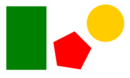
|
image map, image with clickable areas | |||||||||
|
|||||||||||
<td style="background-image: url('/img/smile.png');">background-image</td> |
background-image | background image | |||||||||
|
|||||||||||
<picture><source media="(min-width: 1000px)" srcset="/img/dino_100.png" /><source media="(min-width: 900px)" srcset="/img/grin_50.png" /><img src="/img/smile.png" alt="smile face" /></picture>
|

|
picture, different pictures on different conditions | |||||||||
|
|||||||||||
<table><tr><th>th 1</th><th>th 2</th><th>th 3</th></tr><tr><td>td 1.1</td><td>td 1.2</td><td>td 1.3</td></tr><tr><td>td 2.1</td><td>td 2.2</td><td>td 2.3</td></tr></table>
|
|
table, table row, table header cells, table data cells | |||||||||
<ul><li>list item</li><li>list item</li><li>list item</li></ul>
|
|
unordered list, list item | |||||||||
<ol><li>list item</li><li>list item</li><li>list item</li></ol>
|
|
ordered list, list item | |||||||||
CSS
- CSS - Cascading Style Sheets
- cascading means style applied to a parent element will also apply to all children elements
- 3 ways to add CSS
- Inline
- index.html
<p style="color:red;">Inline CSS</p>
- index.html
- Internal
- index.html
<!DOCTYPE html>
<html>
<head>
  <style>
    p {color: red;}
  </style>
</head>
<body>
  <p>Internal CSS</p>
</body>
</html>
- index.html
- External (recommended)
- /index.html
<!DOCTYPE html> <html> <head> <link rel="stylesheet" href="/css/main.css" /> </head> <body> <p>External CSS</p> </body> </html> - /css/main.css
p { color: red; } - link to CSS file
- Absolute URL
<link rel="stylesheet" href="https://www.dzyubak.com/css/main.css" /> - Relative URL, relative to the current page (begins w/o slash)
<link rel="stylesheet" href="css/main.css" /> - Relative URL, relative to the current domain (begins w/ slash)
<link rel="stylesheet" href="/css/main.css" />(recommended)
- Absolute URL
- /index.html
- Inline